

Hyperscaler vs. Open Source: Can Docling Compete with Document AI?
For a RAG pipeline over technical documentation we benchmarked Google Cloud Document AI against IBM Docling: 87 pages, 26 tables, one LLM judge. Document AI held the edge on layout structure, Docling on tables — and at 10 USD per 1,000 pages, the cost profile decided the architecture.
Marina Siebold · AI & Data Engineer
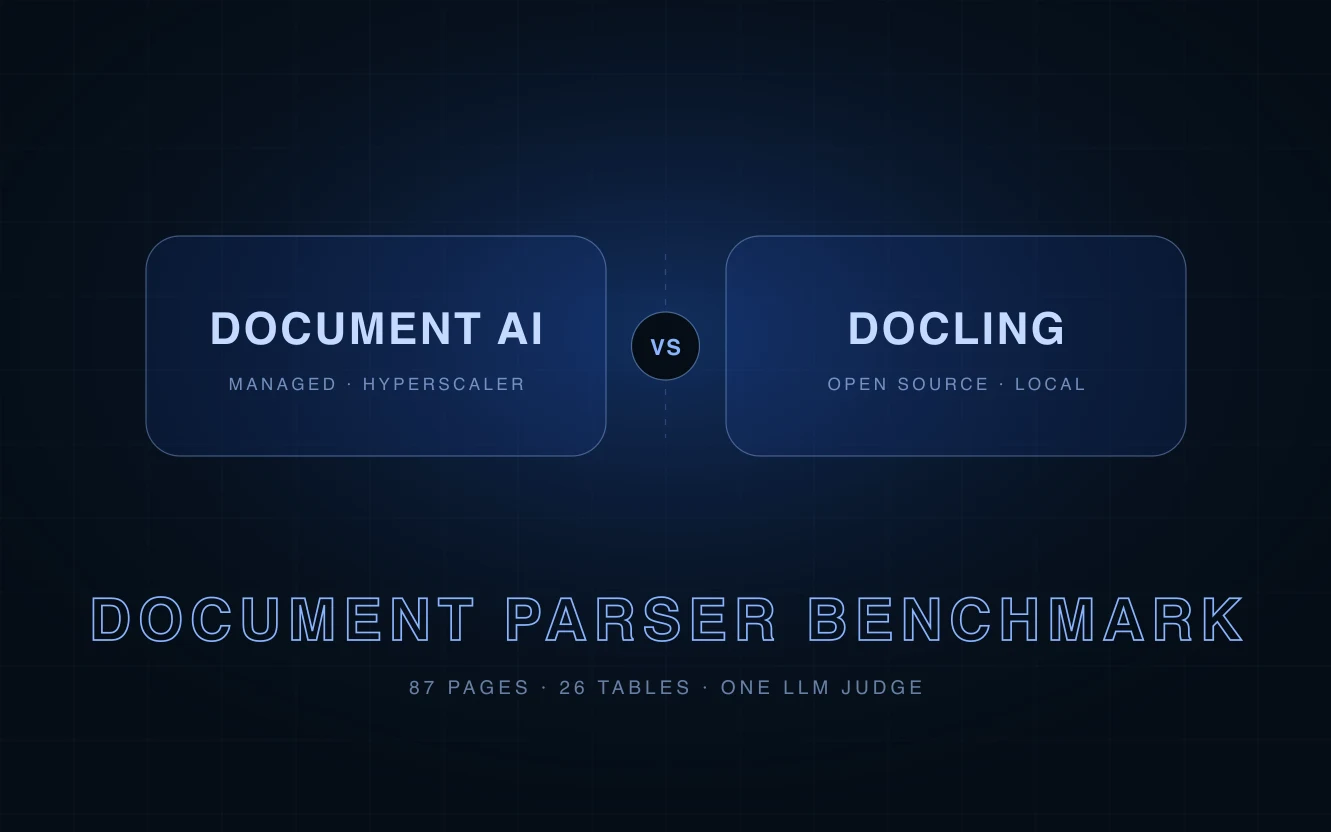
For a recent client project, we built a RAG pipeline to help technicians search and navigate technical documentation more efficiently. The first project stage focused on ingestion: extracting content from a large collection of PDFs and splitting it into meaningful chunks that can later be embedded and stored for retrieval by an agent.
For this step, we needed a parser that could preserve the document’s logical structure — including sections, headings, and table structures.
Our initial candidate for this was Google Cloud Document AI, specifically its Layout Parser. The extraction quality was solid, integration was seamless, and a managed service is fundamentally attractive for production-grade pipelines.
However, reality hit when we calculated the estimated costs: at 10 USD per 1,000 pages, the Layout Parser alone would have consumed most of our project budget given our expected document volume. It was clear we needed a more cost-effective alternative and a resilient benchmark to test how open-source alternatives can measure up against the hyperscaler option.
Our obvious alternative candidate was IBM Docling — an open-source solution we had successfully deployed in prior projects with great results. But how does Docling compare when put head-to-head against Document AI? To help us make a grounded decision, we decided to build a benchmark between the two options. Here are our learnings.
Why and How We Compared
When dealing with complex textual data — in our case service manuals, error code guides, and technical data sheets — the quality of document extraction directly influences downstream RAG answer quality. Misidentified tables, lost section headers, or false text extracted from layouts can directly lead to context degradation and incorrect answers. Therefore, comparing different document parser options and measuring their quality is an important step to creating a solid RAG pipeline.
For Document AI, the setup was rather simple: we configured a pretrained Layout Parser and disabled both table and image annotations, as these annotations are not relevant for our pipeline. Then, we just used the API to retrieve chunks from the parser.
For Docling, we let the standard PDF pipeline run locally on a CPU-only setup. We tested Docling in two configurations: with OCR enabled and with OCR disabled. OCR, or Optical Character Recognition, is used to detect and convert text that is represented visually as part of an image into machine-readable text. When OCR is disabled, Docling primarily relies on text that is already digitally available in the PDF and can therefore be extracted directly.
To make an informed decision, we built a dedicated benchmark and analyzed a targeted sample: a test corpus consisting of 87 pages and 26 tables of production data.
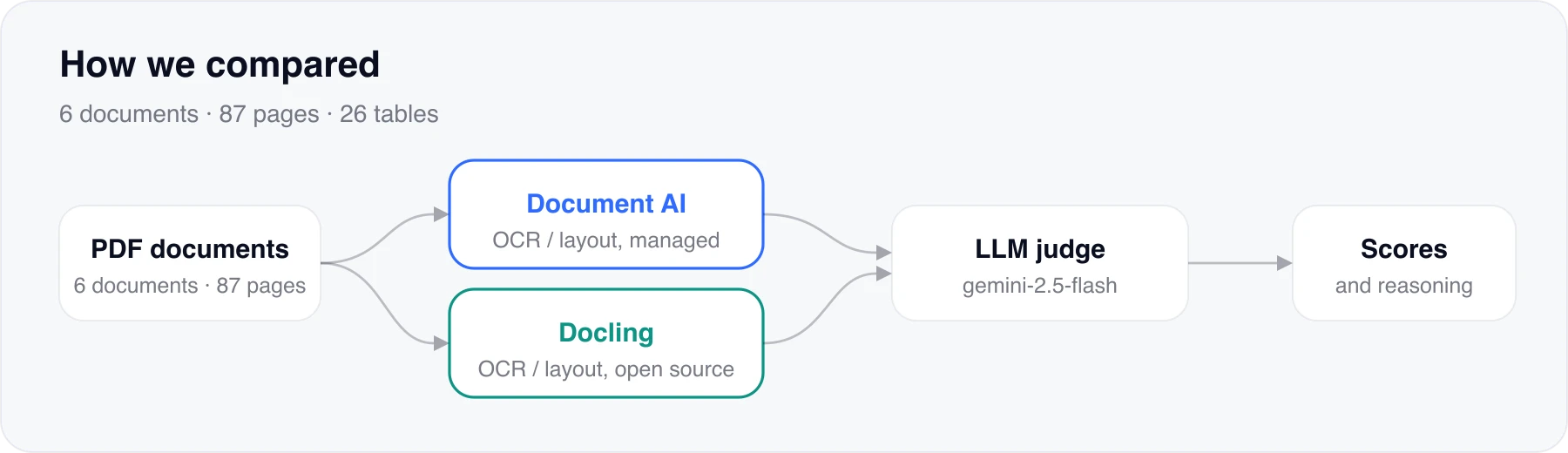
The evaluation workflow was strictly standardized:
- Each PDF was processed by both Document AI and Docling.
- Both outputs were normalized into comparable Markdown.
- Original pages were rendered as PNGs for visual context.
- An LLM judge (Gemini 2.5 Flash) systematically evaluated and scored the extracted outputs at both the document and individual table levels, providing detailed reasoning for each score.
Specifically, we evaluated performance across three main dimensions — one performance metric and two quality metrics:
- Processing time — average seconds per document.
- Text recognition and layout — one score per document, then averaged: general text recognition, correct extraction of headings, paragraphs and other layout structures, and whether tables are recognized as such.
- Table structure and content extraction — one score per table, then averaged: structure (headers, column names, merged columns) and content (correct extraction of text content).
Note: With 87 pages, the sample size is relatively small, and LLM judges exhibit non-deterministic variance between runs. Consequently, narrow score margins were interpreted as “comparable” rather than decisive victories.
Results: Where the Hyperscaler Shines & Where Open Source Surprises
While overall extraction quality was comparable on the surface, distinct strengths emerged under detailed examination.
1. Processing time
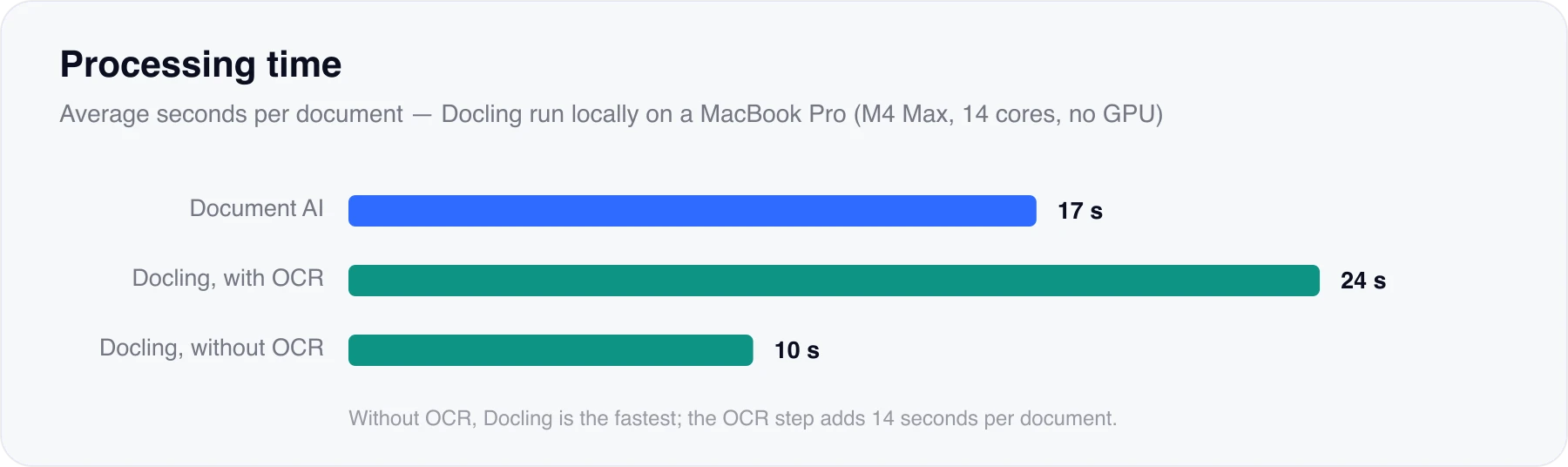
Docling with OCR disabled was the fastest approach, with an average processing time of 10 seconds per document. Document AI required approximately 17 seconds per document, while Docling with OCR was the slowest at around 24 seconds per document.
For Docling, the only relevant difference between the two runs was whether OCR was enabled. This means that the observed performance difference can mainly be attributed to the additional OCR step. With OCR enabled, Docling performs additional text recognition on relevant page regions, which increases the computational workload. The difference was substantial: enabling OCR increased the average processing time from 10 to 24 seconds per document. In our setup (and with our documents), this indicates that OCR introduced a significant processing overhead when executed on the CPU, as the underlying extracted text did not show significant differences for our documents.
Arguably, the processing time of the Docling setup is highly dependent on the hardware configuration on which it is executed. Since Docling runs locally, factors such as CPU performance, number of CPU cores, and available RAM can directly affect processing time. All Docling tests were executed locally and without GPU acceleration. The machine used was a MacBook Pro with an Apple M4 Max, 14 CPU cores, and 36 GB of RAM. Therefore, the measured Docling processing times are specific to this hardware setup and should not be interpreted as fixed performance values for Docling in general.
2. Text Recognition & Layout Structure
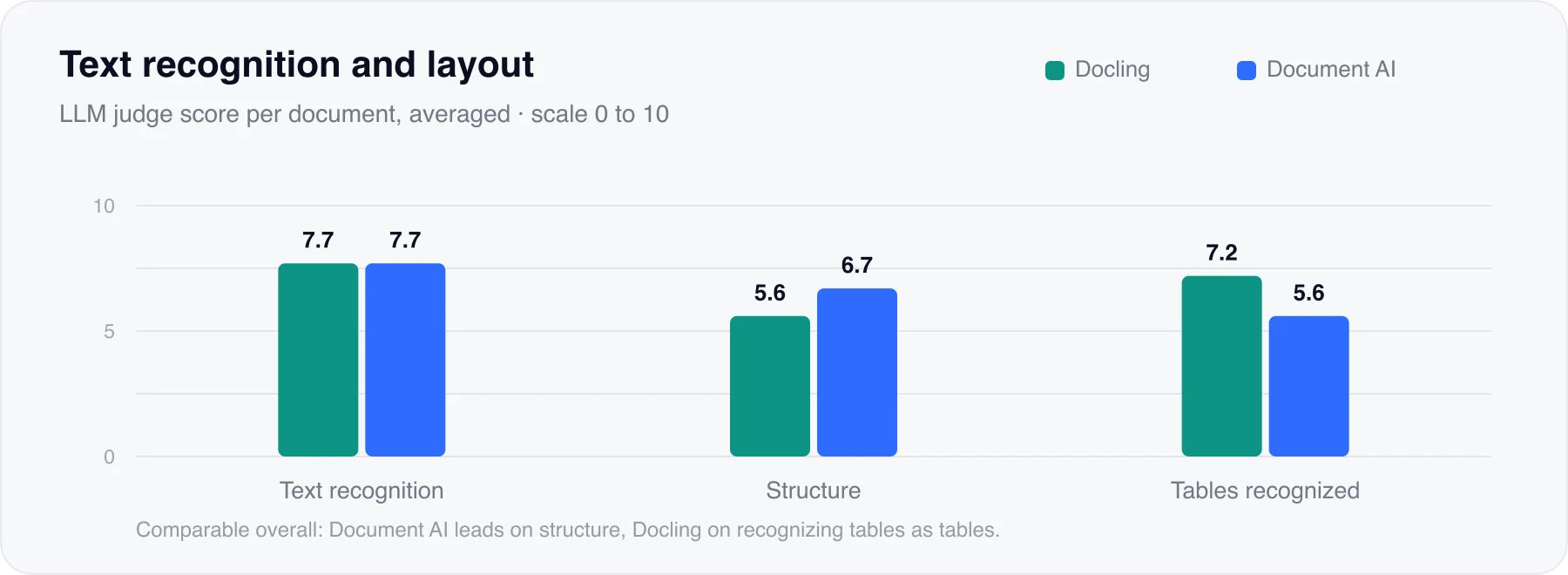
Text recognition was broadly comparable between Google Document AI and Docling. Both extracted text accurately, with only minor issues in more complex documents. The LLM judge found that Document AI was generally more consistent in capitalization, special characters, and complete text extraction, while Docling produced cleaner output by including less text annotating illustrations. However, the differences were minor.
A clearer difference was noticeable in layout recognition. Document AI usually preserved heading hierarchies, paragraphs, lists, and page-specific elements more faithfully, especially in documents with a clear structure. Docling detected most headings but often flattened the hierarchy by always using the same heading level. Docling, however, performed better on recognizing tables as such.
Overall, the benchmark showed no meaningful difference in the parser’s accuracy in extracting text, detecting structure, and recognizing tables. Document AI had an advantage in layout structure, while Docling was stronger at recognizing tables. Given the small sample size and generally strong results, both proved to be solid options.
3. Table Structure & Content Extraction
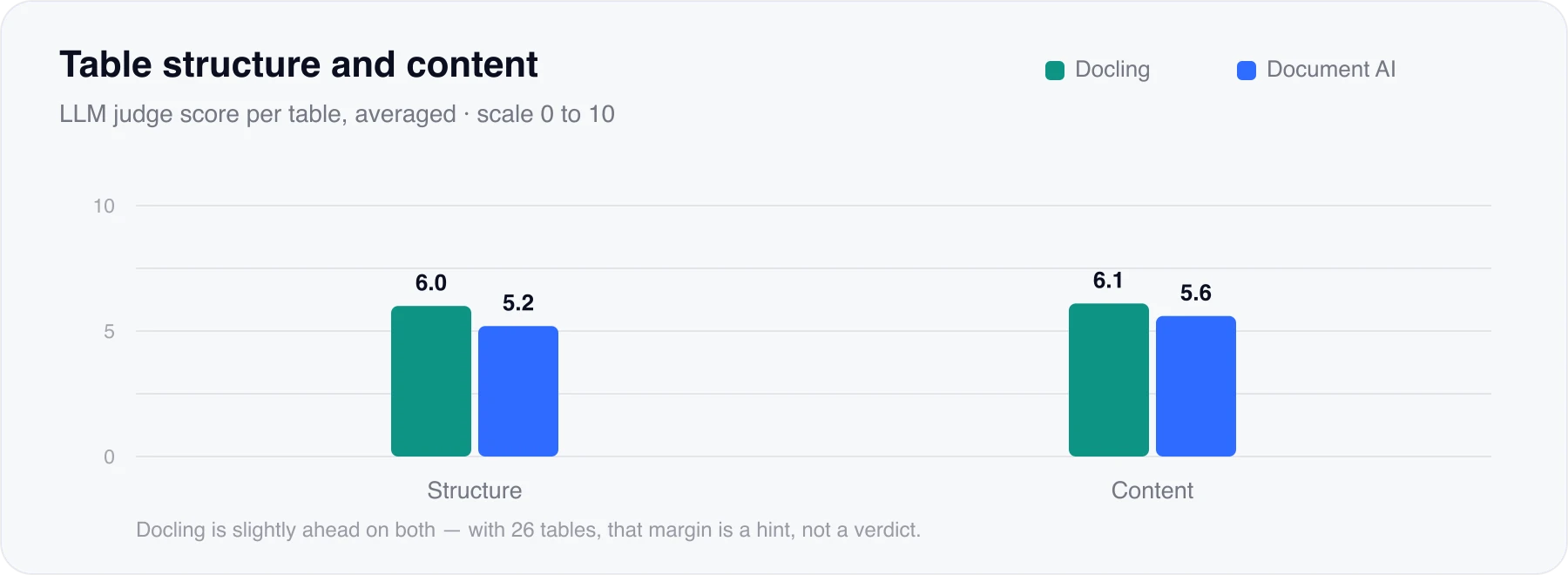
For our use case, the correct extraction of table structure and content was especially relevant as technical documentations rely heavily on complex tabular data (error codes, part numbers, …). Any misread layout and content can directly result in incorrect answers. Here, Docling took the lead: both in maintaining multi-level table structures and in extracting exact cell contents, Docling slightly outperformed Document AI.
Docling’s strongest results occurred on complex technical tables involving merged cells, multi-level headers, row spans, and repeated substructures. It frequently preserved column boundaries more accurately and assigned values to the correct headers. As identified by our LLM judge and subsequently verified by us, common Document AI errors in these cases included merging adjacent columns, combining multiple rows into a single cell, swapping content between columns, and interpreting tables as unstructured text.
Document AI nevertheless performed better on some individual tables. It handled some empty cells, repeated page-spanning headers, and complex merged-cell layouts more faithfully than Docling.
Conclusion: A Conscious Architectural Choice
The main goal of this experiment was to evaluate both parsers under the conditions that matter for our own use case: our document set, our hardware setup, and our budget. The results should therefore not be interpreted as a universal ranking. Still, they do support a broader conclusion: both Google Document AI and Docling perform very well on complex technical documents, including PDFs with irregular layouts and deeply nested tables.
Document AI is known to be particularly strong in traditional OCR scenarios, which were not relevant for our use case. Further, it offers the convenience of a fully managed, serverless cloud service. For traditional OCR workflows dominated by scanned documents — or when a fully managed, serverless setup is required — the hyperscaler remains a good choice. Organizations unable or unwilling to host dedicated compute resources for Docling (especially when running OCR models) will find Document AI very attractive, especially if a small document volume is expected.
However, being a managed cloud service does not automatically make Document AI the best choice. In our case, the documents were primarily digitally generated rather than scanned, and they contained large amounts of structured technical content and dense tables. This is exactly where Docling performed particularly well in our benchmark. Further, for large document volumes, Document AI can become economically unviable as the costs scale with usage, while Docling is open source.
For our RAG pipeline, these trade-offs ultimately made Docling the better fit. It handled our digitally generated technical PDFs well, performed strongly on table-heavy documents, and offered a much more attractive cost profile at scale.
The benchmark transformed what started as a default cloud preference into a deliberate architectural decision: The winning parser is the one that best fits your document type, quality requirements, infrastructure, and budget constraints — and for our project, that winner was Docling.
Weitere Beiträge
Lessons learned from a year of running Pydantic AI in production
A modular agentic system with more than 9,000 active users, one agent framework, and a year of provider changes. What held up: typed tool contracts, OpenTelemetry traces, a tiered context strategy — and the insight that the framework should not become the product.
Beitrag lesen
Evaluating the Evaluator: What Research and Our Experience Taught Us About LLM-as-a-Judge
An LLM judge is a measurement instrument, not an oracle. Research shows that judges carry systematic bias, that the judge prompt is part of the instrument, and that confident verdicts can flip under pressure. Here is what we changed in our own evaluation approach as a result.
Beitrag lesen
What We Learned from Hosting a Prompt-Injection Challenge
Codify AG and Lapiscode hosted a Prompt-Injection Challenge, analyzing over 1,600 attacks against AI agents to demonstrate real-world security risks. The results confirmed that relying on simple system prompts is insufficient, whereas a layered "Defense in Depth" architecture with technical Guardrails significantly reduces vulnerabilities.
Beitrag lesen
Evaluating AI Agents with DeepEval and Arize Phoenix: Lessons from Our Integration Journey
Evaluating AI agents is a major challenge because traditional metrics are inadequate for measuring qualities like "helpfulness" or tracing complex reasoning. To tackle this, we chose DeepEval for its advanced "LLM-as-a-judge" evaluation capabilities and Arize Phoenix for its powerful observability and tracing features.
Beitrag lesenJetzt direkt & unverbindlich kontaktieren
- ✓Unverbindliches Erstgespräch
- ✓Persönliche Beratung von unserem Expertenteam
- ✓Innerhalb von 24 Stunden Rückmeldung